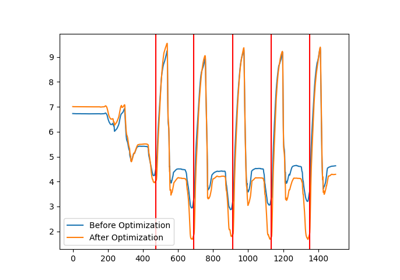
gaitmap.stride_segmentation.InterpolatedDtwTemplate#
- class gaitmap.stride_segmentation.InterpolatedDtwTemplate(*, data: ndarray | DataFrame | None = None, sampling_rate_hz: float | None = None, scaling: BaseTransformer | None = None, interpolation_method: str = 'linear', n_samples: int | None = None, use_cols: Sequence[str | int] | None = None)[source]#
A template that is created by interpolating and then averaging the data of multiple sequences.
Note
This algorithm is only available via the
gaitmap_madpackage and distributed under a AGPL3 licence. To use it, you need to explicitly install thegaitmap_madpackage. Learn more about that here.Use the self_optimize method to create a template from data.
- Parameters:
- data
The actual data representing the template. If this should be a array or a dataframe might depend on your usecase. This data is the unscaled version of the template. Use the
get_datamethod to get the correctly scaled template.- sampling_rate_hz
The sampling rate that was used to record the template data. This will be overwritten by the sampling rate of provided to the
self_optimizemethod.- scaling
A valid scaler instance, that is used to transform the template data. It is usually a good idea to choose a scaler that maps the template to a range from -1-1. The same scaler must then be applied to the data before matching the template. This can be done using the
transform_datamethod.If the scaling is
optimizable, its parameters will be optimized when a new template is created using theself_optimizemethod of the template.- interpolation_method
The method used to interpolate the data, when creating a new template using
self_optimize. Refer tointerp1dfor possible options.- n_samples
The number of samples the created template should have. If
None, the average length of all provided trainings sequences will be used.- use_cols
The columns of the template that should actually be used. If the template is an array this must be a list of int, if it is a dataframe, the content of
use_colsmust match a subset of these columns. This will affect the return value of theget_datamethod.
See also
gaitmap.stride_segmentation.BaseDtwHow to apply templates
gaitmap.stride_segmentation.BarthDtwHow to apply templates for stride segmentation
Notes
This class can be used in combination with
iterate_region_datato easily create a new template based on a labeled stride list.Methods
clone()Create a new instance of the class with all parameters copied over.
from_json(json_str)Import an gaitmap object from its json representation.
get_data()Return the template data.
get_params([deep])Get parameters for this algorithm.
self_optimize(data_sequences[, ...])Create a template from multiple data sequences.
set_params(**params)Set the parameters of this Algorithm.
to_json()Export the current object parameters as json.
transform_data(data, sampling_rate_hz)Transform external data according to the template scaling.
- __init__(*, data: ndarray | DataFrame | None = None, sampling_rate_hz: float | None = None, scaling: BaseTransformer | None = None, interpolation_method: str = 'linear', n_samples: int | None = None, use_cols: Sequence[str | int] | None = None) None[source]#
- clone() Self[source]#
Create a new instance of the class with all parameters copied over.
This will create a new instance of the class itself and all nested objects
- classmethod from_json(json_str: str) Self[source]#
Import an gaitmap object from its json representation.
For details have a look at the this example.
You can use the
to_jsonmethod of a class to export it as a compatible json string.- Parameters:
- json_str
json formatted string
- get_data() ndarray | DataFrame[source]#
Return the template data.
This will only return the columns of data that are listed in
use_colsand will apply the scaling.
- get_params(deep: bool = True) dict[str, Any][source]#
Get parameters for this algorithm.
- Parameters:
- deep
Only relevant if object contains nested algorithm objects. If this is the case and deep is True, the params of these nested objects are included in the output using a prefix like
nested_object_name__(Note the two “_” at the end)
- Returns:
- params
Parameter names mapped to their values.
- self_optimize(data_sequences: Iterable[DataFrame], sampling_rate_hz: float | None = None, *, columns: list[Union[collections.abc.Hashable, str]] | None = None, **_)[source]#
Create a template from multiple data sequences.
All data sequences will be interpolated to match
self.n_samplesand then averaged. Ifself.scalingisoptimizable, the scaler will be optimized as well based on the final template data. Note, that the scaler is not trained or applied to the data, before the template is generated, but only trained on the final template.If you need to normalize the data before interpolation, do it on your own and train your own scaler instance. In this case it set
self.scalingtoNone. To correctly apply the template to new data, make sure that you apply your custom scaler to the data before feeding it into any of theDtwmethods.- Parameters:
- data_sequences
A sequence of pandas dataframes that contain the data to be used for the template.
- sampling_rate_hz
The sampling rate that was used to record the template data. Note, that the final sampling rate might not match this value exactly, as the effective sampling rate will be approximated based on the actual length of the final template.
- columns
The columns of the data that should be used for the template.
- Returns:
- self
The template instance with the template data, sampling rate and scaling adapted based on the data.
- set_params(**params: Any) Self[source]#
Set the parameters of this Algorithm.
To set parameters of nested objects use
nested_object_name__para_name=.
- to_json() str[source]#
Export the current object parameters as json.
For details have a look at the this example.
You can use the
from_jsonmethod of any gaitmap algorithm to load the object again.Warning
This will only export the Parameters of the instance, but not any results!
- transform_data(data: DataFrame, sampling_rate_hz: float) DataFrame[source]#
Transform external data according to the template scaling.
This method should be applied to the data before the template is matched. There is usually no need to do this manually, as all the implemented Dtw methods do this automatically internally.
- Parameters:
- dataSingleSensorData
The data to transform.
- sampling_rate_hzfloat
The sampling rate of the data. This will be forwarded to the scaler, incase it is used.
- Returns:
- SingleSensorData
The transformed data.