Note
Click here to download the full example code
Stride segmentation with Regions of Interest#
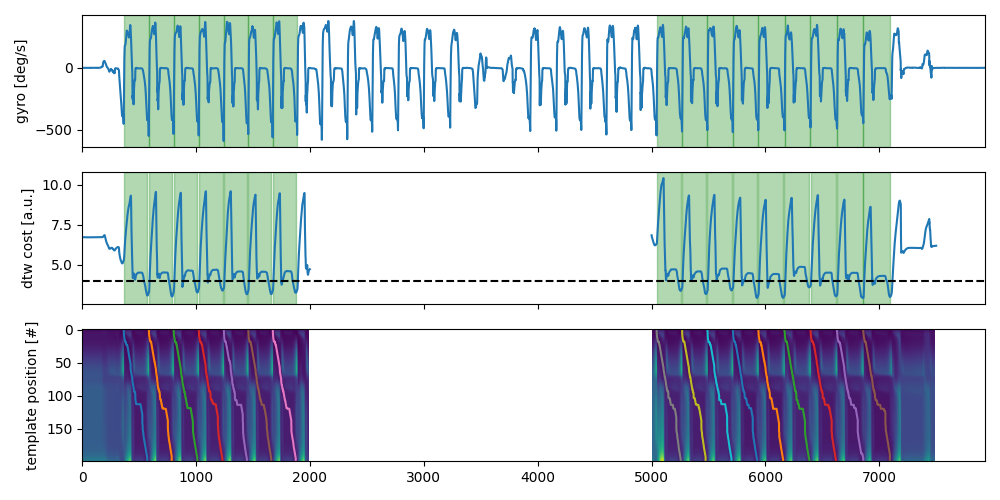
In long datasets it might be desirable to predefine regions of interest in which strides should be segmented. This can massively speed up the computation or focus the analysis on a specific part of the data.
Most of the time such regions of interest would be defined using some sort of gait detection algorithms (e.g.
UllrichGaitSequenceDetection).
In this example we will create an example output of such an algorithms and will use it to limit the search region for
the BarthDtw stride segmentation algorithms.
However, all other stride segmentation algorithms should this functionality as well.
Note, that for smaller datasets, the algorithms might actually be slower when using multiple regions of interest, compared to analysing the entire dataset. This is, because the method relies on a slow Python loop to process the individual regions of interest.
import matplotlib.pyplot as plt
import numpy

numpy.random.seed(0)
Getting some example data#
For this we take some example data that contains the regular walking movement during a 2x20m walk test of a healthy
subject. The IMU signals are already rotated so that they align with the gaitmap SF coordinate system.
The data contains information from two sensors - one from the right and one from the left foot.
We will further convert the data into the body frame, as this is required by the BarthDTW method to perform the
stride segmentation.
from gaitmap.example_data import get_healthy_example_imu_data
from gaitmap.utils.coordinate_conversion import convert_to_fbf

data = get_healthy_example_imu_data()
sampling_rate_hz = 204.8
bf_data = convert_to_fbf(data, left_like="left_", right_like="right_")


data.sort_index(axis=1).head(1)
Defining regions of interest#
We will define two regions of interest (one at the beginning and one at the end of the dataset). We expect the algorithm to only find strides in these regions.
import pandas as pd

roi = pd.DataFrame([[0, 2000], [5000, 7500]], columns=["start", "end"])
roi.index.name = "roi_id"
roi
Setting up the Stride Segmentation#
We will use BarthDTW with the default settings.
Setting up the ROI wrapper#
To apply our method to multiple regions of interest wie use the RoiStrideSegmentation wrapper.
from gaitmap.stride_segmentation import RoiStrideSegmentation

roi_seg = RoiStrideSegmentation(segmentation_algorithm=dtw)
Applying the segmentation#
Instead of our original dtw object we now use the wrapper with the same inputs to segment.
roi_seg = roi_seg.segment(data=bf_data, sampling_rate_hz=sampling_rate_hz, regions_of_interest=roi)
Inspecting the results#
The wrapper will automatically combine all stride lists from all ROIs into one. The additional “roi_id” column indicates in which ROI a stride was identified in.
stride_list_left = roi_seg.stride_list_["left_sensor"]
print(f"{len(stride_list_left)} strides were detected.")
stride_list_left
16 strides were detected.
All other outputs of our stride segmentation method are not accumulated, as they differ from method to method.
However, we can inspect the individual instances stored in the instances_per_roi_ attribute to get this information.
In the following we will plot the cost matrices that are created for ROI. We will see that we now have multiple cost matrices and cost functions per sensor. This is simply because the DTW was applied separately to the two regions. To plot the outputs together, we need to loop all dtw instances.
import numpy as np

# Create combined outputs
sensor = "left_sensor"
cost_funcs = {roi: dtw.cost_function_[sensor] for roi, dtw in roi_seg.instances_per_roi_.items()}
cost_mat = {roi: dtw.acc_cost_mat_[sensor] for roi, dtw in roi_seg.instances_per_roi_.items()}
full_cost_matrix = np.full((len(roi_seg.segmentation_algorithm.template.get_data()), len(roi_seg.data)), np.nan)

fig, axs = plt.subplots(nrows=3, sharex=True, figsize=(10, 5))
roi_seg.data[sensor]["gyr_ml"].reset_index(drop=True).plot(ax=axs[0])
axs[0].set_ylabel("gyro [deg/s]")
for roi, (start, end) in roi_seg.regions_of_interest[["start", "end"]].iterrows():
    axs[1].plot(np.arange(start, end), cost_funcs[roi], c="C0")
    full_cost_matrix[:, start:end] = cost_mat[roi]
axs[1].set_ylabel("dtw cost [a.u.]")
axs[1].axhline(roi_seg.segmentation_algorithm.max_cost, color="k", linestyle="--")
axs[2].imshow(full_cost_matrix, aspect="auto")
axs[2].set_ylabel("template position [#]")
for roi_id, dtw_instance in roi_seg.instances_per_roi_.items():
    roi_start = roi_seg.regions_of_interest.loc[roi_id]["start"]
    for p in dtw_instance.paths_[sensor]:
        axs[2].plot(p.T[1] + roi_start, p.T[0])
    for start, end in dtw_instance.matches_start_end_original_[sensor]:
        axs[1].axvspan(start + roi_start, end + roi_start, alpha=0.3, color="g")
for _, s in roi_seg.stride_list_[sensor][["start", "end"]].iterrows():
    axs[0].axvspan(*s, alpha=0.3, color="g")
axs[0].set_xlabel("time [#]")
fig.tight_layout()
fig.show()
Total running time of the script: ( 0 minutes 2.448 seconds)
Estimated memory usage: 12 MB