gaitmap.preprocessing.sensor_alignment.PcaAlignment#
- class gaitmap.preprocessing.sensor_alignment.PcaAlignment(target_axis: str = 'y', pca_plane_axis: Sequence[str] = ('gyr_x', 'gyr_y'))[source]#
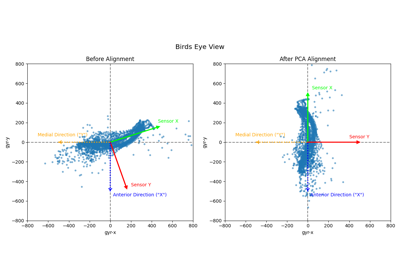
Align dataset target axis, to the main foot rotation plane, which is usually the medio-lateral plane.
The Principle Component Analysis (PCA) can be used to determin the coordinate plane where the main movement component is located, which corresponds to the main component of the PCA after fitting to the provided data. This is typically intended to align one axis of the sensor frame to the foot medio-lateral axis. The ML-axis is therefore assumed to correspond to the principle component with the highest explained variance within the 2D projection (“birds eye view”) of the X-Y sensor frame. To ensure a 2D problem the dataset should be aligned roughly to gravity beforhand so we can assume a fixed z-axis of [0,0,1] and solve the alignment as a pure heading issue.
This approach is inspired by [1]
- Parameters:
- target_axis
axis to which the main component found by the pca analysis will be aligned e.g. “y”
- pca_plane_axis
list of axis names which span the 2D-plane where the pca will be performed e.g. (“gyr_x”,”gyr_y”). Note: the order of the axis defining the pca plane will influence also your target axis! So best keep a x-y order.
- Other Parameters:
- data
The data passed to the
alignmethod.
- Attributes:
See also
sklearn.decomposition.PCADetails on the used PCA implementation for this method.
gaitmap.preprocessing.sensor_alignment.ForwardDirectionSignAlignmentAlignment of the forward direction after PCA Alignment
Notes
The PCA is sign invariant this means only an alignment to the medio-lateral plane will be performend! An additional 180deg flip of the coordinate system might be still necessary after the PCA alignment!
[1]W. Kong, S. Sessa, M. Zecca, and A. Takanishi, “Anatomical Calibration through Post-Processing of Standard Motion Tests Data,” Sensors, vol. 16, no. 12, p. 2011, Dec. 2016. [Online]. Available: https://www.mdpi.com/1424-8220/16/12/2011
Examples
Align dataset to medio-lateral plane, by aligning the y-axis with the dominant component in the gyro x-y-plane
>>> pca_alignment = PcaAlignment(target_axis="y", pca_plane_axis=("gyr_x", "gyr_y"))
>>> pca_alignment = pca_alignment.align(data, 204.8)
>>> pca_alignment.aligned_data_["left_sensor"]
<copy of dataset with axis aligned to the medio-lateral plane>
...
Methods
align(data, **_)Align sensor data.
clone()Create a new instance of the class with all parameters copied over.
from_json(json_str)Import an gaitmap object from its json representation.
get_params([deep])Get parameters for this algorithm.
set_params(**params)Set the parameters of this Algorithm.
to_json()Export the current object parameters as json.
- align(data: DataFrame | dict[Union[collections.abc.Hashable, str], pandas.core.frame.DataFrame], **_) Self[source]#
Align sensor data.
- clone() Self[source]#
Create a new instance of the class with all parameters copied over.
This will create a new instance of the class itself and all nested objects
- classmethod from_json(json_str: str) Self[source]#
Import an gaitmap object from its json representation.
For details have a look at the this example.
You can use the
to_jsonmethod of a class to export it as a compatible json string.- Parameters:
- json_str
json formatted string
- get_params(deep: bool = True) dict[str, Any][source]#
Get parameters for this algorithm.
- Parameters:
- deep
Only relevant if object contains nested algorithm objects. If this is the case and deep is True, the params of these nested objects are included in the output using a prefix like
nested_object_name__(Note the two “_” at the end)
- Returns:
- params
Parameter names mapped to their values.