Note
Click here to download the full example code
BaseDtw simple segmentation#
This example illustrates how subsequent DTW implemented by the BaseDtw can be used
to find multiple matches of a sequence in a longer sequence.
This can be used to segment the larger signal into smaller pieces for further processing.
This example is adapted based on the sDTW example of tslearn
import matplotlib.pyplot as plt
import numpy
import numpy as np

numpy.random.seed(0)
Creating some example data#
As this is just a simple example, we will generate some example data. The short sequence (used as template) will be repeated 5 times to form the large sequence For this example we assume that the sampling rate of all signals is 100 Hz
sampling_rate_hz = 100

n_repeat = 5
sequence_length = 200
dataset = (np.sin(np.linspace(0, 2 * np.pi, sequence_length)) + np.random.normal(size=200) * 0.1).reshape(-1, 1)
dataset_scaled = dataset / np.std(dataset)

# We repeat the long sequence multiple times to generate multiple possible
# matches
long_sequence = numpy.tile(dataset_scaled, (n_repeat, 1))
short_sequence = dataset_scaled

sz1 = len(long_sequence)
sz2 = len(short_sequence)

print(f"Shape long sequence: {long_sequence.shape}")
print(f"Shape short sequence: {short_sequence.shape}")
Shape long sequence: (1000, 1)
Shape short sequence: (200, 1)
Plot the sequences
plt.figure(1, figsize=(6, 3))
plt.plot(long_sequence, label="Long Sequence")
plt.plot(short_sequence, label="Short Sequence")
plt.legend()
plt.show()

Creating a template#
To use BaseDtw we first need to create a template.
The easiest way is to use the create_dtw_template helper function.
We pass the data of the short sequence as the template data.
from gaitmap.stride_segmentation import DtwTemplate

template = DtwTemplate(data=short_sequence, sampling_rate_hz=sampling_rate_hz)

print(template.get_data().shape)
print(template.sampling_rate_hz)
(200, 1)
100
Using BaseDtw#
With the created template we can initialize the BaseDtw. Additionally, we set a set of thresholds that help to prevent false positive matches. Note that these thresholds are adapted for this specific example and need to be modified for a different dataset.
from gaitmap.stride_segmentation import BaseDtw

dtw = BaseDtw(template, min_match_length_s=0.6 * sequence_length / sampling_rate_hz, max_cost=3)
In a second step we apply the dtw to the long sequence Afterwards a set of results are available on the dtw object
dtw = dtw.segment(long_sequence, sampling_rate_hz=sampling_rate_hz)

print(f"{len(dtw.matches_start_end_)} matches were found")
print(dtw.matches_start_end_)
5 matches were found
[[  0 200]
 [200 400]
 [400 600]
 [600 800]
 [800 995]]
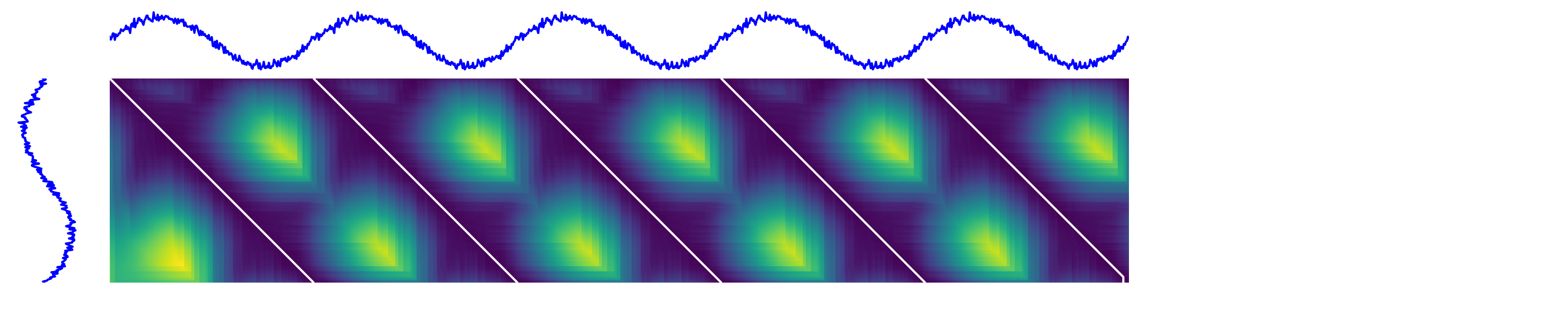
Finally we can plot the results. This plot shows the cost matrix and the individual match paths
cost_matrix = dtw.acc_cost_mat_
paths = dtw.paths_

plt.figure(1, figsize=(6 * n_repeat, 6))

# definitions for the axes
left, bottom = 0.01, 0.1
h_ts = 0.2
w_ts = h_ts / n_repeat
left_h = left + w_ts + 0.02
width = height = 0.65
bottom_h = bottom + height + 0.02

rect_s_y = [left, bottom, w_ts, height]
rect_gram = [left_h, bottom, width, height]
rect_s_x = [left_h, bottom_h, width, h_ts]

ax_gram = plt.axes(rect_gram)
ax_s_x = plt.axes(rect_s_x)
ax_s_y = plt.axes(rect_s_y)

ax_gram.imshow(numpy.sqrt(cost_matrix))
ax_gram.axis("off")
ax_gram.autoscale(False)

# Plot the paths
for path in paths:
    ax_gram.plot([j for (i, j) in path], [i for (i, j) in path], "w-", linewidth=3.0)

ax_s_x.plot(numpy.arange(sz1), long_sequence, "b-", linewidth=3.0)
ax_s_x.axis("off")
ax_s_x.set_xlim((0, sz1 - 1))

ax_s_y.plot(-short_sequence, numpy.arange(sz2)[::-1], "b-", linewidth=3.0)
ax_s_y.axis("off")
ax_s_y.set_ylim((0, sz2 - 1))

plt.show()
Total running time of the script: ( 0 minutes 4.350 seconds)
Estimated memory usage: 9 MB