Note
Click here to download the full example code
Stride Level Trajectory reconstruction#
Gaitmap has two ways to reconstruct the trajectory (orientation and position) of an IMU.
The first method is two use any method from the modules orientation_methods
or position_methods directly.
This is a great option, if you want to reconstruct a trajectory without performing any other step of the pipeline.
The second option is to use any of the available TrajectoryWrapperClasses methods from the
trajectory_reconstruction module.
These allow you to easily calculate multiple trajectories for e.g. multiple strides.
This example illustrates how a trajectory can be reconstructed for each stride by the
StrideLevelTrajectory class.
Note that this example does not take care of any preprocessing steps, which might be necessary for your data, such as
alignment to gravity and axis transformations.
To learn more about such preprocessing steps see this example.
Getting input data#
For this we need a stride event list obtained from an event detection method and the sensor data. The example data used in the following is already in the correct gaitmap coordinate system.
import matplotlib.pyplot as plt

from gaitmap.example_data import get_healthy_example_imu_data, get_healthy_example_stride_events
from gaitmap.trajectory_reconstruction import ForwardBackwardIntegration, SimpleGyroIntegration, StrideLevelTrajectory

stride_list = get_healthy_example_stride_events()
imu_data = get_healthy_example_imu_data()

stride_list["left_sensor"].head(3)
Selecting and Configuring Algorithms#
The stride level method takes an instance of an orientation and a position estimation method as configuration
parameter.
Here, we use simple gyroscopic integration for orientation estimation and forward-backward integration for position
estimation.
You can replace the orientation- or position-estimation methods by any of the methods in
orientation_methods and
position_methods.
Be aware of the assumptions the used methods make.
For example the ForwardBackwardIntegration assumes that the start and
end of each stride is a resting period.
The same assumption is used by the StrideLevelTrajectory itself to
estimate the initial orientation at the beginning of each stride.
Note that this method further assumes the sensor to be aligned with your world coordinate system at the beginning
of the stride (z-axis in direction of gravity).
If this is not True in your case and you need to modify the starting orientation or position, you need to call the
orientation and position methods directly for each each stride without the use of the StrideLevelTrajectory wrapper.
Do so by passing initial_orientation to the initialization of the ori_method.
However, in StrideLevelTrajectory this initial orientation will be
overwritten by an initial orientation estimated from gravity.
Calculate and inspect results#
sampling_frequency_hz = 204.8
trajectory.estimate(data=imu_data, stride_event_list=stride_list, sampling_rate_hz=sampling_frequency_hz)


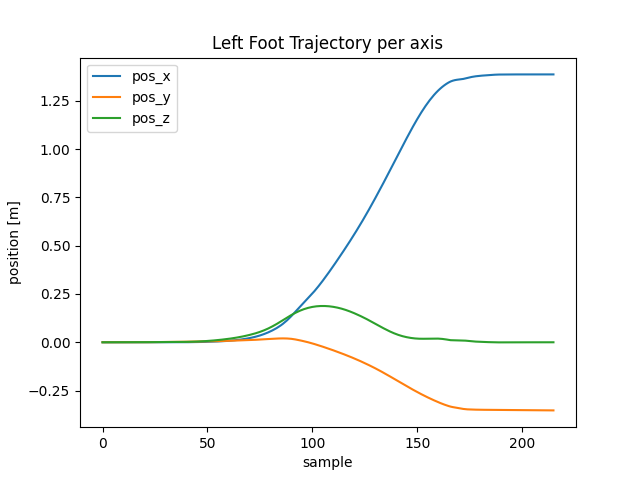
# select the position of the first stride
first_stride_position = trajectory.position_["left_sensor"].loc[0]

first_stride_position.plot()
plt.title("Left Foot Trajectory per axis")
plt.xlabel("sample")
plt.ylabel("position [m]")
plt.show()

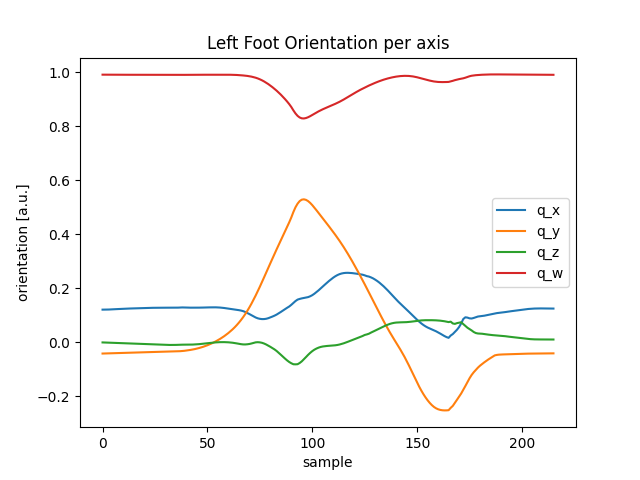
# select the orientation of the first stride
first_stride_orientation = trajectory.orientation_["left_sensor"].loc[0]

first_stride_orientation.plot()
plt.title("Left Foot Orientation per axis")
plt.xlabel("sample")
plt.ylabel("orientation [a.u.]")
plt.show()
Total running time of the script: ( 0 minutes 1.199 seconds)
Estimated memory usage: 9 MB