Note
Click here to download the full example code
BarthDtw stride segmentation#
This example illustrates how subsequent DTW implemented by the BarthDtw can be
used to detect strides in a continuous signal of an IMU signal.
The used implementation is based on the work of Barth et al [1] and adds a set of postprocessing methods that aim to
reduce the chance of false positives.
import matplotlib.pyplot as plt
import numpy

numpy.random.seed(0)
Getting some example data#
For this we take some example data that contains the regular walking movement during a 2x20m walk test of a healthy subject. The IMU signals are already rotated so that they align with the gaitmap SF coordinate system. The data contains information from two sensors - one from the right and one from the left foot.
from gaitmap.example_data import get_healthy_example_imu_data

data = get_healthy_example_imu_data()
sampling_rate_hz = 204.8
data.sort_index(axis=1).head(1)
Selecting a template#
This library ships with the template that was originally used by Barth et al.
It is generated based on manually segmented strides from healthy participants and PD patients.
This template is used by default by BarthDtw, but we will load it manually in
this example.
from gaitmap.stride_segmentation import BarthOriginalTemplate

template = BarthOriginalTemplate()
template.get_data().plot()
plt.xlabel("Time [#]")
plt.ylabel("gyro [deg/s]")
plt.show()

Preparing the data#
The template only makes use of the gyro information. Further, if you use this template in the DTW, your data is expected to be in the gaitmap BF to be able to use the same template for the left and the right foot. Therefore, we need to transform the dataset into the body frame.
from gaitmap.utils.coordinate_conversion import convert_to_fbf

# We use the `..._like` parameters to identify the data of the left and the right foot based on the name of the sensor.
bf_data = convert_to_fbf(data, left_like="left_", right_like="right_")
Applying the DTW#
First we need to initialize the DTW.
In most cases it is sufficient to keep all parameters at default.
However, if you experience any issues you should start modifying the parameters, starting by max_cost,
as it has the highest influence on the result.
from gaitmap.stride_segmentation import BarthDtw

dtw = BarthDtw(template=template)
# Apply the dtw to the data
dtw = dtw.segment(data=bf_data, sampling_rate_hz=sampling_rate_hz)
Inspecting the results#
The main output is the stride_list_, which contains the start and the end of all identified strides.
As we passed a dataset with two sensors, the output will be a dictionary.
stride_list_left = dtw.stride_list_["left_sensor"]
print(f"{len(stride_list_left)} strides were detected.")
stride_list_left.head()
28 strides were detected.
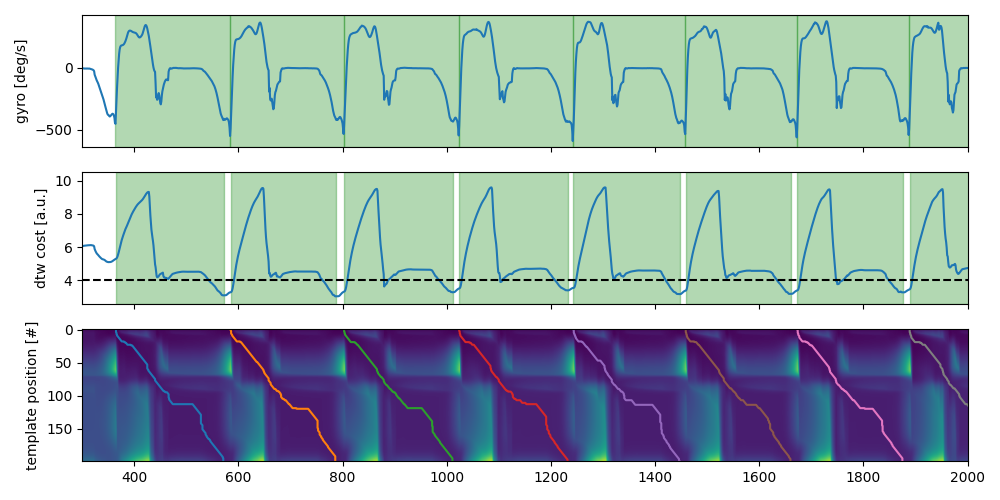
To get a better understanding of the results, we can plot additional information about the results.
The top row shows the gyr_ml axis with the segmented strides plotted on top.
They are postprocessed to snap to the closed data minimum.
In the second row the cost function of the DTW is plotted.
Each minimum marks a potential end of a stride.
The black dotted line indicates the used max_cost threshold to search for stride candidates.
The drawn boxes show the raw result of the DTW without the snap-to-min postprocessing.
The third row shows the entire accumulated cost matrix and the path each stride takes through the cost matrix to
achieve minimal cost.
Only the first couple of strides of the left foot are shown.
sensor = "left_sensor"
fig, axs = plt.subplots(nrows=3, sharex=True, figsize=(10, 5))
dtw.data[sensor]["gyr_ml"].reset_index(drop=True).plot(ax=axs[0])
axs[0].set_ylabel("gyro [deg/s]")
axs[1].plot(dtw.cost_function_[sensor])
axs[1].set_ylabel("dtw cost [a.u.]")
axs[1].axhline(dtw.max_cost, color="k", linestyle="--")
axs[2].imshow(dtw.acc_cost_mat_[sensor], aspect="auto")
axs[2].set_ylabel("template position [#]")
for p in dtw.paths_[sensor]:
    axs[2].plot(p.T[1], p.T[0])
for s in dtw.matches_start_end_original_[sensor]:
    axs[1].axvspan(*s, alpha=0.3, color="g")
for _, s in dtw.stride_list_[sensor][["start", "end"]].iterrows():
    axs[0].axvspan(*s, alpha=0.3, color="g")

axs[0].set_xlim(300, 2000)
axs[0].set_xlabel("time [#]")
fig.tight_layout()
fig.show()
Total running time of the script: ( 0 minutes 1.790 seconds)
Estimated memory usage: 39 MB